VIPUL / CREATIVE
00 · Owned core system · AI video production

CineForge

My AI-native production workspace for taking a brief through blueprint, narration, branded scenes, voice, music, composition and final rendering.

Owned system12 commands · 10 skill packs · 4 templates · 17 AI tools
Visual evidence

See this system in action.

Just Kiddin V3 motion ad (parent-style concept) plus the published RushabhAhirOfficial long-form.

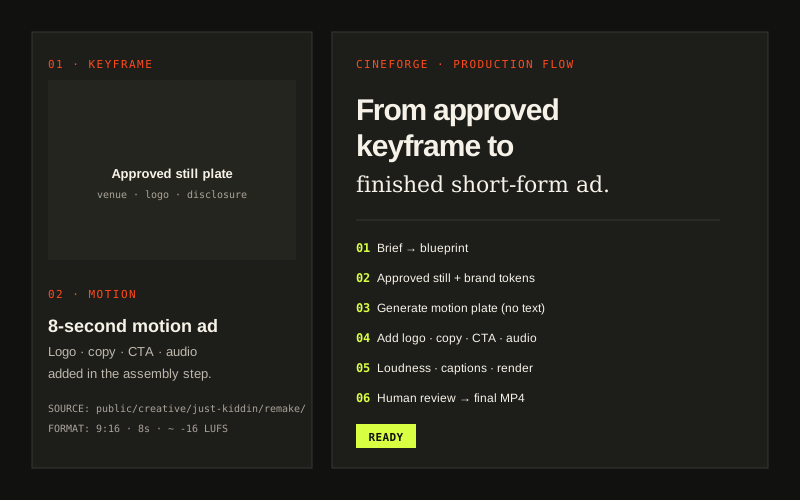
CineForge: video production evidence card

From approved keyframe to finished short-form ad.

Just Kiddin V3 motion ad (parent-style concept) plus the published RushabhAhirOfficial long-form.

In one sentence

What problem does it solve?

Marketing teams need repeatable branded video without rebuilding the planning, asset, narration and rendering workflow for every campaign.

Input → process → output

The simple breakdown.

01

What goes in

Campaign briefEntered by a marketer

Goal, audience, market, offer and call to action.

Brand systemUploaded or saved once

Colours, typography, voice, logo and visual rules.

Source assetsUploaded

Product imagery, footage, screenshots or approved generated assets.

Video formatEntered by a marketer

Duration, screen shape, platform and delivery requirement.

02

What happens

  1. 01Brief
  2. 02Blueprint
  3. 03Brand
  4. 04Narration
  5. 05Assets
  6. 06Composition
  7. 07Review
  8. 08Render
03

What comes out

  • Production blueprint
  • Narration and scene-timing file
  • 16:9, 9:16 and 1:1 compositions
  • Product walkthrough or launch film
  • Caption and thumbnail package
  • Render manifest and final MP4
Inside the engine

What it checks and how it runs.

Automation does the repeatable work. Important decisions and anything customer-facing remain reviewable.

What it analyzes

  • Campaign objective and message hierarchy
  • Scene structure and pacing
  • Narration duration and visual timing
  • Brand-token consistency
  • Asset coverage and missing-shot requirements
  • Render and platform constraints

Technical architecture

Control

Command and skill layer selects the correct production path.

Planning

Structured blueprint defines scenes, timing, assets and narration.

Production

React and Remotion components assemble branded motion scenes.

Media

FFmpeg prepares, normalizes and packages audio and video assets.

Gate

Visual, timing and brand checks precede a human render decision.

Quality checks

  • Message and brand alignment
  • Narration-to-scene synchronization
  • Safe-area and platform-format checks
  • Asset resolution and continuity
  • Caption legibility
  • Render validation

Human controls

  • No final publish action
  • Human review before final render
  • Source and asset manifest
  • Replaceable model providers
Tools and connections

What is required to run it.

The system supports live connections when available and upload or dry-run modes when client access is restricted.

Core

TypeScriptReactRemotionFFmpeg

Media

Whisper-compatible transcriptionTTS adapterImage/video generation adapter

Operations

Command libraryReusable templatesAsset validationRender logs
LLM providerRequired

Blueprint, scripts and structured production decisions.

Text-to-speechOptional

Needed only when synthetic narration is requested.

Image or video generationOptional

Used for missing visual assets; owned footage can replace it.

Cloud storageAdapter-ready

For production asset delivery and render archives.

Where I used this kind of system

Applications in real work.

YouTube and regional-media project

Sagar Kathrotiya Show

Video planning, branded production, reusable scenes and social-video formats.

Indoor playground and family-entertainment company

Just Kiddin

Campaign and promotional-video production.

My contribution

Built by Vipul Sharma as his main reusable video-production system. Open-source tools are used as building blocks where listed.